
Public Speaking
How to Stop Rushing Through a Presentation and Stay Within Your Time Limit
If you tend to rush through a pitch or presentation, telling yourself to “slow down” probably isn't enough. You may manage it for the first few minutes, only to speed up when you notice the clock or reach a section you find difficult to explain.
The solution is to prepare your content, plan your timing, and practice the parts where you tend to rush. Here's a step-by-step approach to speaking at a more controlled pace while staying within your presentation time limit.
The solution is to prepare your content, plan your timing, and practice the parts where you tend to rush. Here's a step-by-step approach to speaking at a more controlled pace while staying within your presentation time limit.
Step 1. Check whether your presentation is too long
Before trying to change how fast you speak, find out whether you have too much content for the time available. If your 10-minute pitch takes 13 minutes to deliver, you can't solve the problem by forcing yourself to speak faster without risking clarity.
Rehearse the entire presentation aloud and time it, including slide transitions and pauses. Compare the result with your allotted time and identify which sections take longer than expected.
Rehearse the entire presentation aloud and time it, including slide transitions and pauses. Compare the result with your allotted time and identify which sections take longer than expected.
If you consistently run over time, edit the content first. Keep the information your audience needs to understand your main point, and remove details that don't directly support it.
Step 2. Calculate how much time each section should take
A presentation can feel manageable overall while individual sections quietly consume too much time. This is especially common when explaining a technical decision, describing a product, or answering the questions you expect investors or executives to have.
Divide your presentation into its main sections and assign a realistic time budget to each one. For example, a 10-minute startup pitch might allocate 2 minutes to the problem, 3 minutes to the solution and demonstration, 2 minutes to traction, and the remaining time to the business model and closing.
Divide your presentation into its main sections and assign a realistic time budget to each one. For example, a 10-minute startup pitch might allocate 2 minutes to the problem, 3 minutes to the solution and demonstration, 2 minutes to traction, and the remaining time to the business model and closing.
Use these numbers as a guide rather than a rigid script.
Step 3. Mark where you want to pause
When people rush, they often remove the pauses that help an audience follow their message. You might move straight from a key result to the next slide, or rush through an important claim because silence feels awkward.
Mark a few specific places in your script where a pause will help: after a key message, before an important result, or between two major ideas. You can also mark where you want to take a breath before a longer explanation.
Mark a few specific places in your script where a pause will help: after a key message, before an important result, or between two major ideas. You can also mark where you want to take a breath before a longer explanation.
You don't need to pause after every sentence; focus on moments when your audience needs time to process what you've said.
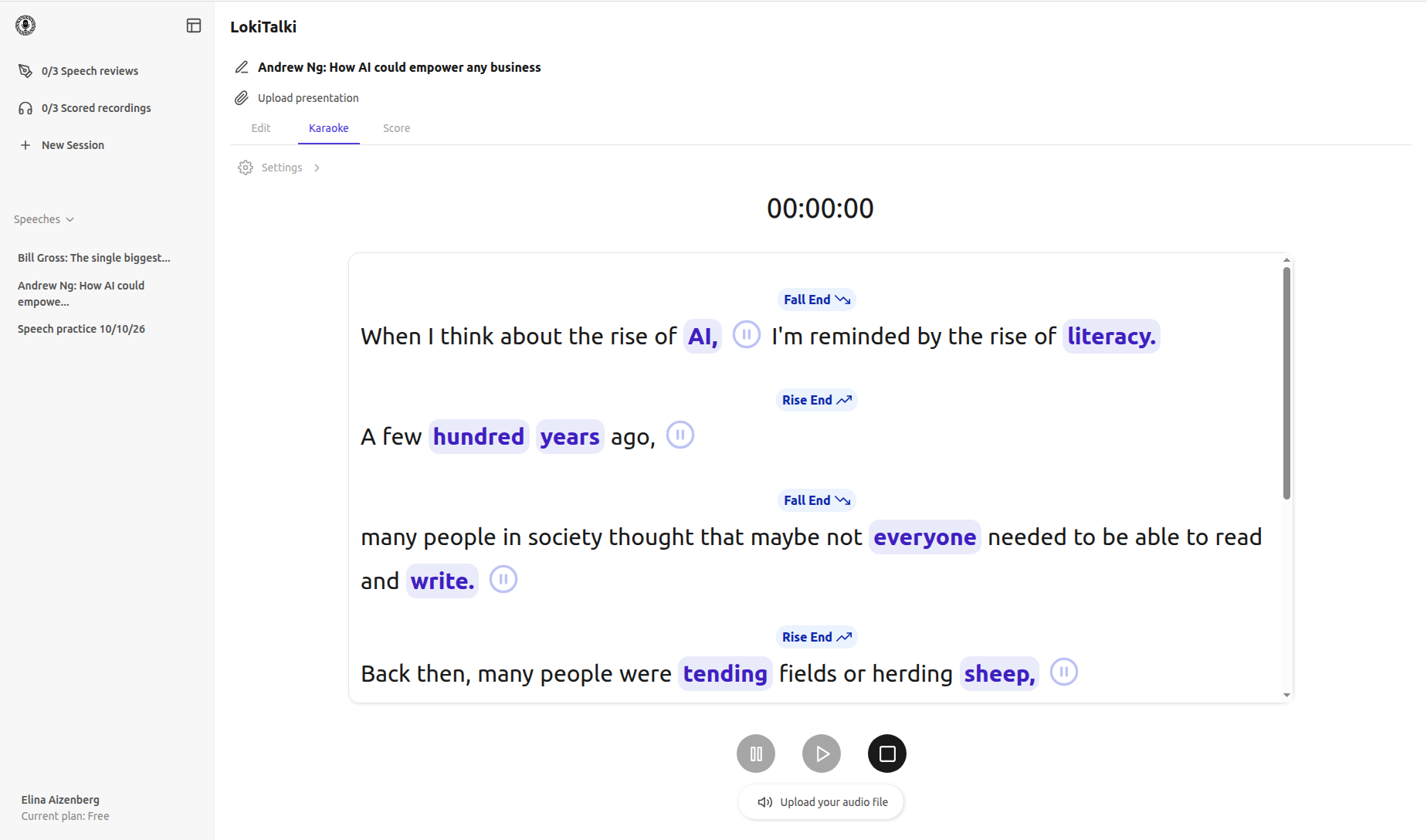
With LokiTalki, you can add pause cues to your script manually or let AI suggest where they might help, then practice your pitch or presentation with those cues in the teleprompter. This makes it easier to get used to pausing at important moments instead of rushing straight into the next sentence.
Step 4. Set timing checkpoints
Don't wait until the final slide to discover that you're running out of time. Choose 2 or 3 checkpoints in your presentation, such as the end of the introduction and the end of the main demonstration, and note the time you should reach each one.
During rehearsal, compare your actual progress with those checkpoints. If you're already behind at the midpoint, you can adjust the remaining content rather than rushing through every slide at the end.
During rehearsal, compare your actual progress with those checkpoints. If you're already behind at the midpoint, you can adjust the remaining content rather than rushing through every slide at the end.
Step 5. Practice varying your pace
Speaking at a controlled pace doesn't mean speaking slowly from beginning to end.
A presentation sounds more natural when your pace reflects the content: background information may move along comfortably, while an important technical trade-off or business result deserves a little more time.
Choose a few key sentences and practice delivering them more deliberately, with a brief pause afterward. Then rehearse the surrounding material at your normal conversational pace so the entire presentation doesn't become unnaturally slow.
A presentation sounds more natural when your pace reflects the content: background information may move along comfortably, while an important technical trade-off or business result deserves a little more time.
Choose a few key sentences and practice delivering them more deliberately, with a brief pause afterward. Then rehearse the surrounding material at your normal conversational pace so the entire presentation doesn't become unnaturally slow.
Step 6. Record yourself and review the rushed sections
It can be difficult to notice your own pace while you're concentrating on the next sentence or slide. A recording gives you a chance to review the presentation from the audience's perspective and identify where your delivery becomes hurried.
Listen for sections where words run together, pauses disappear, or explanations become difficult to follow. Check the timing too: are you spending too long on the introduction and squeezing the main point into the final minutes?
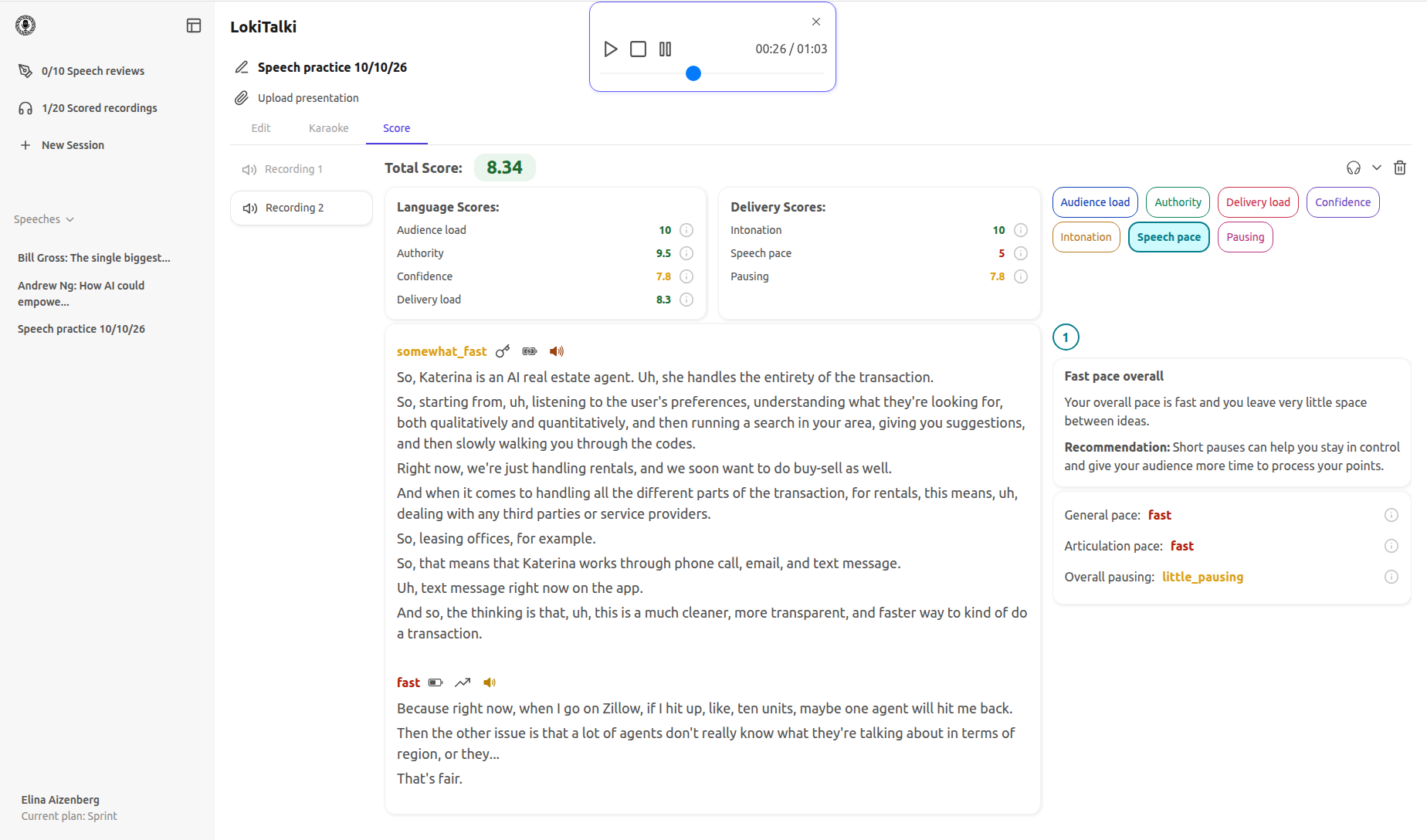
With LokiTalki, you can record your presentation, listen back to your delivery, and get feedback on your speaking pace and pauses. You'll also receive recommendations on where to adjust your pace or leave more room for pauses, so you know what to focus on in your next rehearsal.
How can I stop rushing through a pitch?
Start by timing a complete rehearsal aloud.
If it runs over the limit, shorten the content and assign time budgets to the main sections.
Then mark important pauses, set timing checkpoints, and record yourself so you can identify where your pace changes.
With each attempt, aim for a delivery that feels controlled and leaves your audience enough time to understand the message.
Staying within your time limit shouldn't mean racing to the finish. It means knowing what matters, allocating your time deliberately, and practicing until you can deliver the presentation without constantly watching the clock.
If it runs over the limit, shorten the content and assign time budgets to the main sections.
Then mark important pauses, set timing checkpoints, and record yourself so you can identify where your pace changes.
With each attempt, aim for a delivery that feels controlled and leaves your audience enough time to understand the message.
Staying within your time limit shouldn't mean racing to the finish. It means knowing what matters, allocating your time deliberately, and practicing until you can deliver the presentation without constantly watching the clock.
13.10.2026
See also